Showing posts with label technology. Show all posts

Sony's PS4 virtual reality headset to be announced in March


Sony developing Virtual Reality headset for PS4


Sony is preparing to reveal the final piece of its PS4 hardware strategy at TGS by showcasing a PlayStation-branded virtual reality head-mounted display, CVG has learned.

[Update: Following the publication of this article, CVG has been told by people connected to the matter that there are no longer any existing plans to publicly showcase the virtual reality headset at the Tokyo Game Show.

In August, when Sony abandoned its initial strategy to reveal the device at Gamescom, CVG was told at the time that the reveal had been be pushed back to the Tokyo event. Now the expectation is to showcase the headset in 2014.

Executives at Sony have demonstrated the VR display to a select number of developers at E3 and Gamescom, and will also conduct closed-doors meetings at TGS.

Sony originally intended to reveal the headset at Gamescom but plans fell through at the eleventh hour. The company is currently weighing up whether the PS4 device should be pitched as a key differentiator for the console or a non-essential add-on.

The matter has been slightly complicated, but not derailed, by the growing industry support for Oculus Rift. Sony's device will be a categorical rival to Oculus, and for months there have been rumours suggesting the two companies are seeking a partnership.


A games developer familiar with Sony's plans, who wished to remain anonymous, told CVG that Evolution Studios is currently working with the device to simulate a cockpit view on its
Share On:

The Last of Us: Left Behind review


It says much of the quality and depth of The Last of Us' characters and world that Naughty Dog could have picked any one of a number of threads to explore in this, the first and only story expansion for its seminal action-adventure. The strained relationship between Joel and his brother Tommy; Marlene's journey from Ellie's guardian to head of the Fireflies; the story of Ish, the enigmatic survivor whose notes detail his harrowing experiences in Pittsburgh - any might have worked.

Instead, Neil Druckmann, Bruce Straley and their team have chosen to explore one of the defining relationships of our young heroine Ellie's life - her close friendship with a fellow teenage survivor, Riley. Those that have played through The Last of Us already know how this story ends and likely have an idea of how it might play out, and so it is to the developer's significant credit that Left Behind manages to defy foreknowledge to tell a story that is touching, revealing and important.

Left Behind presents an unexpected duality, contrasting the Ellie with whom we are familiar with one whom we've never met. Ostensibly, it is a snapshot of a pivotal time in Ellie and Riley's friendship that plays out against the backdrop of a post-outbreak world, a world in which quarantine zones and death are everyday considerations and where trips to the mall and carefree teenage frivolity are wholly alien concepts. To pick out any single instance of this juxtaposition would be to deny you the joy of discovery. Suffice to say that exploration is its own reward, and it's as amusing as it is poignant to witness the two friends walk amongst the relics of an opulent past and wonder aloud at the bemusing superficiality of it all.


In its way, Left Behind also serves as an examination of Ellie's later relationship with Joel. It offers insight into the depth of the bond that exists between the two and provides a deeper understanding of this relationship by exploring events that are only alluded to in the main story. In doing so, it once again turns the pseudo-father-daughter relationship on its head and offers still more to ponder in the main story's ambiguous ending. While there's certainly value in playing through The Last of Us again prior to starting Left Behind, there's also a surprising amount to be taken from venturing through the main story
Share On:

The rise of the phablet


Go back to 2010 and you'd be hard pushed to find a handset which sported a screen bigger than 4 inches. Back then the big phones of the year were the 3.5-inch iPhone 4, 3.7-inch HTC Desire and the 4-inch Samsung Galaxy S.

Today we're seeing handsets rocking screens in excess of 6-inches, while the bustling budget tablet market is churning out top quality devices in the 7-inch arena.

The line between phones and tablets is more blurred than it's ever been and the considerable amount of crossover has resulted in the coining of the rather inelegant phrase "phablet" - love it or hate it, the phrase and the devices it's attached to are here to stay.


In the beginning

Our first real taste of a phablet was back in 2011 when the Samsung Galaxy Note was launched to a muted response. People scoffed at its ridiculously large 5.3-inch display and 90s S-Pen stylus, but little did we know Samsung was onto something.

Alan Thomas from Carphone Warehouse explains: "The phablet was a slow burner. When the original Samsung Galaxy Note hit the shelves it wasn't instantly popular. The industry as a whole didn't know what to make of it.

"But, as Samsung marketed it and showed what it could do, why you use it, people found it offered something they wanted."


Samsung's Note series remains the most recognised of the phablet generation with the Korean firm adding the Galaxy Note 2 and Galaxy Note 3 in the following years, but it has now been joined by the likes of Sony, Nokia and HTC in the race for the best supersized smartphone.

It's still not clear what defines a phablet, and Thomas told us "it's getting a bit debatable, but typically a phablet has a screen size larger than 5.3 inches and smaller than 7 inches. Tablets normally have screens of 7 inches and over and smartphone screens tend to be 5.2 inches or under.

"There is a little bit of overlap and it's largely due to how the manufacturer chooses to market their devices."


Why oh why?

There wasn't much of a calling for our smartphones to dramatically increase in size before the Galaxy Note popped its head up, so what advantages do phablets actually provide?

Thomas notes: "people have really begun to use their smartphones a lot more for the internet, and the larger screens make it more
Share On:

PS Vita Slim (2014)


PS Vita Slim (2014): First Impressions

What is the Sony PS Vita Slim?
The new PS Vita is the 2014 edition of Sony’s handheld console. It is cheaper, slimmer and lighter than its predecessor. Although Sony is keen to say it is still simply called the PS Vita, we’re sure it’ll quickly adopt the Vita Slim moniker.

The key selling point of the new Vita is its design, as the software and processing power under the hood are near-identical to the last model. It's slimmer, and has an LCD screen rather than an OLED one.

For existing PS Vita owners, those design tweaks make the latest model feel quite different from its predecessor.

PS Vita (2014) - Design
Sony has listened to gamer feedback to make the Vita easier and more comfortable to hold for long periods of time. Even when picking up the new handheld for the first time, the difference is clear.

25 per cent of the original Vita’s weight has been shaved off to make the latest model feel considerably lighter than the original. It's a welcome change. The original was by no means a heifer at launch, but in a direct comparison it feels like quite the dead weight.


The PS Vita Slim has a new soft, matt finish on the rear and the finger grips have been enlarged to help you endure those extended gaming sessions. These touches make the new model much more tactile and finger-friendly than the former gloss finish. The rear touch panel is still glossy though, so your fingers won’t notice a change there.

To help reduce accidental presses, the rear touch panel has been reduced by around 30 per cent. From our brief play with top Vita title Tearaway, the smaller touchpad doesn’t affect the way you play whatsoever. And it is still large enough to feel accessible and convenient without having to stretch your fingers too far.

Changes to the buttons are some of the more subtle design alterations, with the symbol buttons and d-pad receiving minor cosmetic changes. The start and select buttons under the right analogue stick are now small and round rather than oval, and the PS Home button is no longer backlit.

Instead there are a duo of LED lights at the top of the device to indicate power and battery levels.


The best new feature of the PS Vita Slim is Sony’s abandoning of
Share On:

Top 7 best budget Tablets


The iPad Air is ruling the roost as the best tablet in the world, but with prices starting at £399 and rising all the way to £739, it's clearly priced in a bracket way above many people's budget.

Apple's sky-high prices mean those wanting a more affordable tablet experience will have to look elsewhere, although the original iPad Mini has seen a price cut since its successor, the iPad Mini with Retina display, came onto the scene.

Google's Android operating system now adorns a multitude of tablets, from those priced at the same lofty heights of Apple's offerings, to those that can be picked up for less than £100 at your local supermarket – although we'd advise against purchasing most of these, and instead check out the superior options below.

For those of you who are still with us, well done. To reward you for your loyalty, here are some top tablets for under £250.


1. New Nexus 7 (2013)
 
 
Price: from £199
OS: Android 4.4 KitKat
Review score: 4.5/5

With a quad-core processor, beefy 12-core GPU, 7-inch full HD display and being the first tablet to run the superb Android KitKat operating system, the new Nexus 7 is quite simply the best budget tablet out there.

The 16GB, Wi-Fi only version is available for just £199, while the 32GB Wi-Fi model will set you back a still reasonable £239. It's quite possibly the bargain of the century.

The only real shortcoming is there is no microSD card slot, meaning you're stuck with 32GB at most – although that can be easily overlooked at this startlingly attractive price.


2. LG G Pad 8.3


Price: from £229.99
OS: Android 4.2 Jelly Bean
Review score: 4.5/5

If the 7-inch tablet range is a little too small for your liking, and the iPad mini 2 is just out of your price range then you'll love the LG G Pad 8.3.

As you may have already guessed it sports a 8.3-inch display, a full HD affair which looks great and with a 1.7GHz quad-core processor and 2GB, the G Pad 8.3 has no trouble running Android Jelly Bean.

The metal finish means the G Pad 8.3 also feels great, almost putting it on a par with the premium design of the iPad mini - it's a lovely tablet which won't disappoint.


3. Amazon Kindle Fire HDX 7


Price: from £199
OS: Android 4.2 Jelly Bean
Review
Share On:

iPad Pro release date, rumours and news


Apple did something interesting with the launch of the latest full-sized iPad (aside from a total hardware revamp): Gave it a new name. The iPad Air alludes to the Cupertino, Calif. company adopting the naming convention of its laptop lines, the MacBook Air and Pro series, for its premiere range of tablets.

Logic would dictate, then, that if Apple were to release an even more sizable iPad, it would be with a professional bent and named the iPad Pro. So, we're looking at 2014 for a newer, bigger iPad entering a product category that has seen little success thus far. Will Apple be the one to legitimize the "professional's tablet?"

Cut to the chase
What is it? A brand new, larger iPad
When will it release? Either spring or fall 2014, we expect
What will it cost? Likely somewhere between the iPad Air and MacBook Air


iPad Pro release date

The iPad Pro release date will be in 2014, following the iPad Air, which released November 1, 2013. However, there are many rumors regarding the tablet's firm release date.

Unnamed Foxconn sources have told Chinese news site Pad News that Apple plans either a late winter/spring or October 2014 release date. To further confuse things, these sources also claim that Apple is working on two versions of the pro-level slate.

According to Pad News, an iPad Pro with a 2K screen resolution will launch in April 2014, while a 4K iPad Pro will land in October. Korea Times's sources at a "local first-tier display supplier" report that a single version will launch "sometime early next year" with a nearly UHD resolution.

Even more sources reporting to China's United Daily News, point to another iPad Pro manufacturing partner entirely: Quanta Computer. DigiTimes's sources (hit-and-miss with rumors) recently backed up this report, claiming that Apple expected the manufacturer to have either a 12.9 or 13.3-inch model ready. Now, the Taiwanese outlet's sources say that Apple is leaning toward the smaller screen.

As if to mix things up even more, International Business Times reports that Apple is aiming for winter or even a spring 2015 release, according to its Foxconn sources.

Computer World points out that most US school districts determine their budgets in January or February each year. So, a fall or winter 2014 launch would make the most sense.


The competition already heats up

Samsung beat Apple to the punch in
Share On:

Ipad Air: Logitech FabricSkin Keyboard Folio review


Pros
-Classy design with front and back protection
-Easy to remove iPad when you want
-Clever magnetic stand design

Cons
-Keyboard takes a little getting used to
-Pricey in comparison to alternatives


Logitech FabricSkin Keyboard Folio for iPad Air review

What is the Logitech FabricSkin Keyboard Folio?

As if to alleviate any doubt, Logitech seems determined to answer this question in full using just the name. As its title suggests this a folio case with a keyboard, while the 'FabricSkin' part refers to how the keyboard and outer shell are splashproof. It's Logitech's second attempt at such a case and it doesn't come cheap at £119, but it has a lot of plusses if you can overlook the price.


FabricSkin Keyboard Folio: Design

This version is a serious step up from the original FabricSkin Keyboard Folio. It still protects the front and rear of the iPad, but this version trades the soft touch material of the original for a hardier, more satisfying textile material over a hard plastic shell.

The combination gives the FabricSkin Keyboard Portfolio a more tactile feel, but just as important it's thinner and lighter than before. The old version, admittedly using a heavier iPad, weighed in comfortably over 1kg combined. An iPad Air and this Folio, however, are a more manageable 880g. It's a still a fair bit heavier than an iPad Air on its own, but it's far more in line with Logitech's popular Ultrathin Keyboard Cover for iPad Air than before.


This makes the FabricSkin a far more viable solution for anyone who wants a Folio-style keyboard and case in one, but doesn't want to sacrifice too much portability. It helps, too, that in this incarnation the FabricSkin Keyboard Folio looks very classy. The textile exterior looks far more professional and smart, while the choice of either a white or a (rather fetching to our eyes) yellow interior gives you a little choice.

All these improvements are great and the Folio's best feature remains: the magnetic clasp. This holds the iPad in place when in typing mode, with the Bluetooth connection automatically engaging (or disengaging) when its activated. It's a neat, very user-friendly touch that means you're never left wondering whether the keyboard is connected or not and saves on battery life -- Logitech claims up to three months when used around three hours per day.

One final plus point is that's it's very
Share On:

Ipad Air: Logitech Ultrathin Keyboard review


Pros
-Great typing experience
-Doesn't slip around on flat surfaces
-Comfortable angle for typing
-Clips on and off easily

Cons
-Only covers screen
-Large hinge is unsightly


Logitech Ultrathin Keyboard Cover for iPad Air review

What is the Logitech Ultrathin Keyboard Cover for iPad Air?

Logitech's reputation for great accessories is well-established, and it has long held the title of 'best keyboard cover for iPad' thanks to the Ultrathin Keyboard Cover. This is the latest version, adapted and tweaked to fit with new narrower, lighter iPad Air. Surely Logitech can't have broken a winning formula? Clearly not.


Logitech Ultrathin Keyboard Cover: Design

We'll deal with the obvious questions first. Making the Ultrathin Keyboard Cover smaller to fit the iPad Air has had no meaningful impact on the quality of the keyboard. Most keys are the exact same size, with only the Tab and Caps Lock keys being slightly smaller than before.

That's good news, though we were a little surprised to discover that iPad Air version is no lighter or thinner than the original. It weighs 330g on its own, or just under 800g when combined with an iPad Air. It's still impressively thin and light compared to the alternatives, but perhaps not as much as original compared to the iPad Air.


This fact isn't helped by the fact the hinge is a little chunkier and more obtrusive, a necessary evil due to the slightly curvier frame of the iPad Air compared to the steeply tapered edges of preceding iPads. You just notice it more than on the original. It's not a deal breaker by any means, but the fussiest of owners may take offense. Likewise, the slightly jarring gap along the front edge when closed is a little ugly.

Logitech has made some subtle improvements too, though. The old Ultrathin had a habit of slip sliding around on some surfaces, so Logitech has added a couple of small rubber feet at the front and a rubber strip at the back that runs nearly the whole length of the hinge. We're not sure the feet at the front are much use, but the strip at the rear does a great job preventing the keyboard from sliding as you type.


New version in black, old in red

As before the iPad sits in a narrow ridge when in typing mode, and you must detach the iPad from the magnetic hinge to
Share On:

Sony Xperia Z2 release date, news and rumours


Sony loves a flagship smartphone and, if current rumors ring true, the Japanese firm is lining up its third in just over a year in the form of the Sony Xperia Z2.

January 2013 saw the arrival of the Xperia Z at CES in Las Vegas, which was followed in September 2013 by the Xperia Z1 at IFA in Berlin - and now we're hearing that the Xperia Z2 will arrive at MWC 2014 at the end of February.

Compare Sony's product cycle to the likes of Samsung or Apple - where we see an annual reboot of real flagships such as the Galaxy S4 and iPhone 5S - and you start wondering whether the Japanese firm has gone mad, or perhaps is onto something.

We've rounded up all the latest news, leaks and rumors surrounding the Xperia Z2 to bring you a comprehensive overview of what you may be able to expect from the phone.


Sony Xperia Z2 release date and price

There were rumors suggesting the Sony Xperia Z2 would be outed at CES 2014, but instead we were given the Xperia Z1 Compact and a US variant of the Xperia Z1.

April 2014 has also been mooted as a potential Xperia Z2 release date, but this date now appears to have gone cold.

This means all eyes are now on MWC 2014, with perennial leaker @evleaks tipping the codenamed Sony Sirius handset for a show appearance.


Sony Xperia Z2 display

According to Xperia Z2 specs leaked online, the handset is in line for a stunning 5.2-inch display - up from the 5-inch screen on the Xperia Z1 - and, if true, it would mean the Z2 would match the LG G2 in terms of size.

With a rumored 506ppi, 2K screen, the Xperia Z2 will smash its rivals with its 2560 x 1440 resolution, with the G2 mustering 424ppi and the Xperia Z1 rocking 441ppi full HD solutions.


Sony Xperia Z2 power

While the 2K screen will stand out, when it comes to power things appear to be a little less exciting with reports centering around the same 2.3GHz quad-core processor which you'll find in the Xperia Z1 and Z1 Compact.

That's not to say the Xperia Z2 will be under-powered - far from it in fact - but we were hoping to see perhaps an octa-core chip inside the next Sony powerhouse. Of course that is
Share On:

Android 4.4 KitKat review


Pros
-Fast and frictionless
-New productivity options
-Project Svelte
-Improved Google Now

Cons
-Hangouts needs work
-Experience Launcher exclusive
-Hopped into bed with Nestle
                                                                            -No split-screen apps

1. Introduction 


Everyone was expecting Key Lime Pie to serve as the delicious moniker for the next version of Android. Google surprised us all by bucking tradition and releasing Android 4.4 under the name KitKat.

Version 4.0 started life as Ice Cream Sandwich, but the last three decimal additions came under the Jelly Bean banner. This new version was obviously deemed different enough to snag a new nickname, but not different enough to merit a jump to version 5.0.

That 0.1 bump hardly does it justice. Don't be fooled: this is an important step up for Android. KitKat is super-smooth, the UI is refined and elegant, there are improvements to the long-neglected calling and messaging side of the platform, a new focus on productivity, and your fortune-telling digital assistant is brought front and centre as Google Now reaches maturity.

 
General surprise in the tech world wasn't just based on the erroneous supposition that Key Lime Pie had to be next; there were also some raised eyebrows at the idea of Google entering into a tawdry cross-licensing deal with Nestle which would see a flood of Android-shaped KitKats hitting the shops offering buyers the chance to win Nexus 7 tablets or Google Play credit.

According to Google the promotion was its idea and no money changed hands. With Nestle producing 50 million Android KitKat bars it certainly looks like a sweet deal for them.

Naming conventions aside, the 4.4 update is about addressing some of the Android criticisms that simply won't go away and it does so with aplomb.

There's a real focus on the consumer here, with a smattering of useful new features, a noticeable bump in performance, and some optimization to ensure that budget hardware is not left behind.

Android 4.4 is easily the best version of the platform to date, and Google has left the ball firmly in the OEMs' court when it comes to rolling out the upgrades.

Leading the field by extending the update beyond its Nexus line to the Moto G also neatly illustrates the move to improve the Android experience on low-end, affordable hardware.

First impressions

KitKat really makes a mockery of the idea that iOS 7 is more refined than Android. This
version of the platform
Share On:

Sony Vaio Fit 11a Flip Hands-on


Sony Vaio Fit 11a Flip review: Hands-on at CES 2014

What is the Sony Vaio Fit 11a Flip?

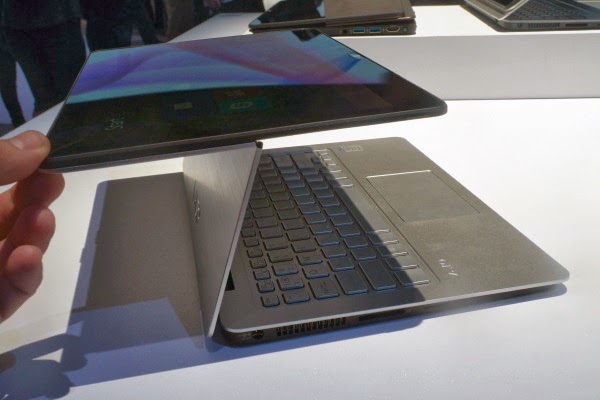
The Sony Vaio Fit 11a is an 11-inch laptop with a clever second screen hinge that lets you flip the screen around, turning the keyboard base into a stand for the display – perfect for watching films or showing someone else what's on-screen. You can also close the laptop with the screen on the outside, turning it into a chunky tablet. To give it more tablet cred, the Fit 11a also has an active digitiser pen. It's a smaller version of the other Fit laptops Sony released last year.


Sony Vaio Fit 11a – Design and Features

The Sony Vaio Fit 11a is a curious mix of things. It's a Ultrabook-ish laptop, it's sort-of a tablet, and it has elements of a graphics tablet too.

It's more than a normal laptop because of two things – the Active pen and the second hinge that sits halfway up the laptop lid. The latter earns the Vaio Fit 11a the title 'flip' computer, because the screen literally flips over, back onto the outside of the laptop lid.

To some this may seem less useful than a full hybrid, because when in its tablet-like form it's very thick for tablet. It's arguably a bit thick to be called an Ultrabook too, although doubtless some will call it one. It weighs 1.27kg, which is light enough to carry around without shoulder ache, if not particularly notable given the screen size.


It's a nicely-built laptop, though, which is a necessary reassurance when the secondary hinge is an obvious point at which the Vaio Fit 11a may fail. It doesn't feel immensely strong but Sony says it has tested the hinge with 20,000 cycles of movement – which we can't really argue with.

The lid is made of metal, but the inner part of it is plastic. It's understandable as this is not an exceedingly expensive laptop. We don't have UK prices, but the Fit 11a starts from $799 in the US – so it'll sell for well under £1000 here.

It's also not a super-powerful PC, though, using a quad-core Pentium N3520 processor rather than the speedier Intel Core type. You get 128GB of storage and 8GB of RAM, although the spec may change slightly when it hits our shores.


Sony Vaio Fit 11a Flip – Screen and Pen

The Sony Vaio Fit
Share On:

10 cool things you can make right now with the 3D Printer


3D printers have been around for a few years now, but they've not quite managed to grab the imagination until very recently...


In the last few months, pioneers have picked up the art of 3D printing, looking to build anything from sex toys to food, to entire houses. Some attempts and ventures have been more successful than others, but one thing is clear - 3D printing has enormous potential. It might be less time than you think before we're replicating food in our own homes.


Without further ado, here are 10 of the coolest (and sometimes weirdest) things you can currently make with a 3D printer.


1. ODD Atom guitar

This Les Paul-inspired axe has an intricate lattice design made of Duraform PA, an ultra-strong form of nylon. It’s fused together using selective laser sintering - a more durable form of 3D printing that fuses together multiple 0.1mm layers of nylon powder. Buyers can choose their preferred hardware to go with the printed guitar body.

Link: Odd Guitars | Video


2. Replacement Jaw


In June 2011, a Dutch woman received a replacement jaw. No big deal you may think, but this mandible was built from scratch by a 3D printer. The process is similar to that of the ODD guitar, with layers of powder - this time titanium - fused together by a laser. The result was a replacement jaw that was incredibly accurate to the patient, lowering her recovery time and saving costs for both her and the hospital.


Link: BBC News


3. Flute

This flute is the handiwork of MIT student Amit Zoran. But Zoran is no traditional craftsman - this flute was built via CAD software called Rhino 4.0, and crafted by Objet's Connex500 3D printer. Although it's needs some tweaking, the sound is acoustically very good. We could be seeing all sorts of musical instruments - even totally new designs - being built like this in the future.

Link: Amit Zoran | Video


4. Wiki Weapon


This project to make a 3D-printable gun has been the subject of much media attention, and has made great strides in recent years. So far though, only certain gun components can be machined in this way, and even those are prone to breakage. So no, you can’t print AK-47s in your shed.


Link: Defense Distributed | Video


5. Micro Formula 1 Car

Researchers at Vienna University of Technology have printed
Share On:

Top smartphones to look forward in 2014


With the pace of smartphone evolution moving so fast, there's always something waiting in the wings. No sooner have you spied the latest handset, but there's anticipation of something else, the next big thing.

We've rounded up the best smartphones for 2013, those we consider to be the best across all platforms, and we've regularly updated that list as the smartphone world has evolved over the last year. You can find those in our Best smartphones 2013 feature.

Here we're looking at those phones that haven't yet launched, those we know are coming, or are anticipated. Some will be rumour, some will be fact, but here we'll cut through the speculation to highlight those phones we really want to see. We'll be updating this list on a regular basis, with those device rumours we think are credible and exciting, and devices just announced but yet to hit the shelves.


HTC M8/new HTC One


We've known since July 2013 that the next HTC flagship handset is referred to internally as the HTC M8, the successor to the M7, the device that became the HTC One. With HTC saying that the "One" name is here to stay, it's safe to predict that the final commercial name will be new HTC One or HTC One (2014) or something like that. That much has been mentioned by a judge in a patent case in the UK, along with a launch date of Q1 2014.

HTC is a creature of habit, so we'd predict that the next-gen HTC One will launch in February 2014. Perhaps not at Mobile World Congress 2014, but within a few weeks of the mobile tradeshow with its own global launch event and we'd expect the shipping date to be the end of March or early April.

As for the specs, it looks like HTC will be bringing the M8 up to mark with a 2.3GHz Qualcomm Snapdragon 800 chipset, a 5-inch 1920 x 1080 pixel resolution display and Android 4.4 KitKat with Sense 6.0. There's little to surprise in there and we suspect most of the attention will be on the metal body construction as HTC looks to repeat the luscious looks of the 2013 HTC One.

We'll be keeping a close eye on HTC and bringing you any news we hear on the next HTC handset.


Sony Xperia Z2/Sirius


Sony used CES 2014 to launch two devices, the Z1
Share On:

Top Android Tablets to buy 2014


What is the best Android tablet to buy in 2014? Could it be the latest budget Android tablet the New Nexus 7 or the forthcoming Samsung Galaxy Tab 3? Here's our guide to the 10-inch through to 7-inch Android tablets that get the T3 seal of approval

So the iPad (fourth-generation) just doesn't do it for you, and you'd prefer to add a Google Android tablet to your current Android phone existence. Well, we may just be able to help. With the tablet-optimized Android 3.0 Honeycomb OS firmly in the past, Google's latest updates Android 4.0, Android 4.2 Jelly Bean and  Jelly Bean 4.3 are now in full force. It's certainly a good time to grab a Google-powered slate, get downloading some Android tablet apps and say goodbye to your laptop or notebook.

If you have tablets on the mind, specifically Android ones, here are the best ones we've played with you can buy right now.


1. Samsung Galaxy NotePRO 12.2

Perfect for business folk, the largest of Samsung's tab line-up boasts a laptop encroaching 12.2-inch display with a resolution of 2560x1600 and the nitfty ability to use four apps at the same time. An interface re-jig, named Magazine UX pulls in a load of content in a design that doesn't look that much different from the tiles in Windows 8. As it's part of the Note series, you'll have access to the S-Pen for drawing, making notes and the like. Under the faux-leather hood is a Snapdragon 800 processor, a whopping 3GB RAM, Android 4.4 Kit Kat, while an 8-meg cam takes care of the snaps.

Price: TBA | Samsung 


2. Samsung Galaxy TabPRO 8.4, 10.1 and 12.2

Not content with just unleashing one version of its new TabPRO, the latest slate from Samsung comes in three flavours - an iPad Mini and LG G-Pad baiting 8.3 incher, a more traditional 10.1 and an extra large 12.2-inch version. Even with these different sizes, each boast a 2560x1600 resolution, Android 4.4 and a snappy Snapdragon 800 processor, while the larger 12.2 device packs 3GB of RAM (the others still have the reasonable 2GB). A new and rather nice looking Magazine UX displays all your content in an easy to read manner, while there's an 8-meg snapper on the rear to take care of photos. It looks like Samsung has finally stepped up its game when it comes to tablets.

Price:
Share On:

Valve Steam Controller Hands-on


Pro
-Precise
-Novel and fun to use

Cons
-Can it keep up with mouse and keyboard players?


Valve has several hurdles to hop before it can turn PC gaming into a living room experience. Besides getting the Steam Box to market with its 13 hardware partners and pushing the SteamOS, it needs to get PC die hards to give a controller a chance.

That's the task the Valve Steam Box controller has before it, and it's no easy one. It needs to offer the versatility and precision that approximates the mouse and keyboard setup.


While Valve has opted to license its SteamOS to hardware partners, it will be manufacturing its own controller. During an offsite event at CES 2014 I had the chance to take Valve's Steam Box controller for a test drive across multiple genres of games.

Now Valve won't be the only one making a Steam controller, those third-party hardware partners will be entering the fray as well. It also won't be forcing anyone to give up the mouse and keyboard. That classic gaming setup may not be couch optimized, but it will be an option for those who value the old ways of fragging a foe.


Valve staff on site at the event told us that the controller we were trying out is not a final build. The Washington-based gaming empire is a bunch of perfectionists, if nothing else. They told us they already had tweaks in mind for the button layout, the form factor and overall feel of the controller.

With that in mind here are our impressions of Valve's Steam Box controller, after diving into a little single player gaming on an internal Valve Steam Box.
Light, nimble and precise

Holding the Steam Controller for the first time I was shocked by its weight, or lack thereof. It's light, to the point where I thought it might be hollow.

That's likely because Valve's final Steam Box controller will be wireless, and the demo versions I used were wired by microUSB. Having a battery in there will definitely add some heft. 


The build is plastic, of course, but feels like quality work. The matte finish shrugs off fingerprints and felt as comfortable and natural as an Xbox One controller.

The most unique aspect of Valve's controller has to be the touchpads. Instead of the analog sticks of a standard console controller you've got two touchpads for
Share On: