Showing posts with label Laptops. Show all posts

Sony Vaio Fit 11a Flip Hands-on


Sony Vaio Fit 11a Flip review: Hands-on at CES 2014

What is the Sony Vaio Fit 11a Flip?

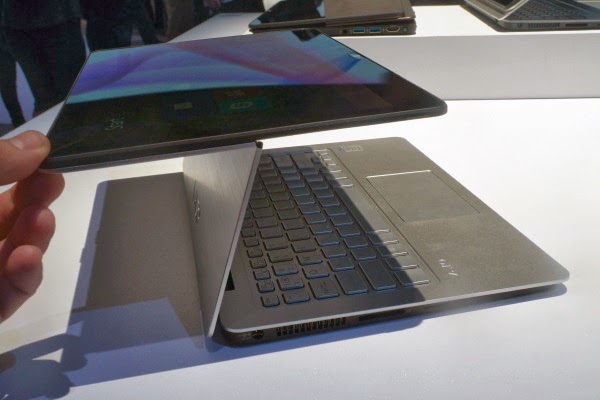
The Sony Vaio Fit 11a is an 11-inch laptop with a clever second screen hinge that lets you flip the screen around, turning the keyboard base into a stand for the display – perfect for watching films or showing someone else what's on-screen. You can also close the laptop with the screen on the outside, turning it into a chunky tablet. To give it more tablet cred, the Fit 11a also has an active digitiser pen. It's a smaller version of the other Fit laptops Sony released last year.


Sony Vaio Fit 11a – Design and Features

The Sony Vaio Fit 11a is a curious mix of things. It's a Ultrabook-ish laptop, it's sort-of a tablet, and it has elements of a graphics tablet too.

It's more than a normal laptop because of two things – the Active pen and the second hinge that sits halfway up the laptop lid. The latter earns the Vaio Fit 11a the title 'flip' computer, because the screen literally flips over, back onto the outside of the laptop lid.

To some this may seem less useful than a full hybrid, because when in its tablet-like form it's very thick for tablet. It's arguably a bit thick to be called an Ultrabook too, although doubtless some will call it one. It weighs 1.27kg, which is light enough to carry around without shoulder ache, if not particularly notable given the screen size.


It's a nicely-built laptop, though, which is a necessary reassurance when the secondary hinge is an obvious point at which the Vaio Fit 11a may fail. It doesn't feel immensely strong but Sony says it has tested the hinge with 20,000 cycles of movement – which we can't really argue with.

The lid is made of metal, but the inner part of it is plastic. It's understandable as this is not an exceedingly expensive laptop. We don't have UK prices, but the Fit 11a starts from $799 in the US – so it'll sell for well under £1000 here.

It's also not a super-powerful PC, though, using a quad-core Pentium N3520 processor rather than the speedier Intel Core type. You get 128GB of storage and 8GB of RAM, although the spec may change slightly when it hits our shores.


Sony Vaio Fit 11a Flip – Screen and Pen

The Sony Vaio Fit
Share On:

The Toshiba Chromebook


Key Features: 13.3-inch 1,366 x 768 display; Runs on Chrome OS; 16GB internal memory; 2GB RAM; HD webcam; Up to 9 hour battery life
Manufacturer: Toshiba
Toshiba Chromebook review: first impressions from CES 2014

What is the Toshiba Chromebook?
The Toshiba Chromebook is the company’s first Google-powered laptop following the likes of Samsung, Acer and HP with a cloud-based laptop that won’t break the bank.

The £250 Chromebook is the first to pack a 13.3-inch display, with Intel Bay Trail innards promising all-day battery life and quick boot up times all packaged in a lightweight and portable design. 


Toshiba Chromebook: Design

Drawing clear inspiration from Samsung’s Chromebook offerings, the clamshell-style laptop with its metallic silver finish or ‘light gold’ as Toshiba refers to it, is not as exciting to look at as the Chromebook Pixel. The hinge is discreetly hidden unlike Samsung’s Series 3 Chromebook with just the Chrome logo and Toshiba name breaking up the otherwise plain exterior.

Considering the sub-£250 price it doesn’t come as much of a surprise to find that it’s constructed from plastic. Everything feels reasonably solid though and the body is reasonably slim at just 20.2mm thick. It’s also extremely light to hold weighing in at just 1.5kg, so it’s primed for carrying around all day.

In terms of physical connectivity, there’s a single HDMI port, two USB 3.0 ports and an audio jack alongside the charging port situated on other side of the body. Additionally, it supports Wi-Fi a/g/n and Bluetooth 4.0, so it ultimately matches most Chromebooks in the connectivity department. There’s a HD webcam in tow above the screen to take care of video chats and speakers situated on the bottom lid.


The chiclet-style keyboard with matte black keys creates a very familiar typing experience if you have previously used Samsung and Acer Chromebooks offering decent travel and a satisfying click. One of our biggest frustrations about Chromebook keyboards is the omission of a Caps Lock key for a Search key. Acer has since reinstated it on its latest Chromebooks, so it’s disappointing not to see Toshiba follow suit.

The keyboard is joined by a nicely sized multi-touch trackpad, again not too dissimilar from the ones that have popped up on rival Chromebooks offering a nice, flat surface to support two-finger scrolling when you are scrawling the web.

Chromebook Pixel aside, previous Google-powered laptops have not really been about looks and
Share On:

Microsoft: What to Expect in 2014


Looking back, 2013 was a big year for Microsoft, with multiple new products – improved Surface tablets, Windows 8.1 and the launch of the Xbox One, to name but a few. Not to mention the $7.2 billion (£4.6 billion) acquisition of Nokia's mobile phone unit.


On top of that, Steve Ballmer, long-time CEO of Microsoft, announced his retirement in August and will be stepping down within the next 10 months.


But that's all in the past. Microsoft is focusing firmly on the future, aiming to bring new and innovative products to market and continuing its core 'devices and services' focus. Here's a taste of what 2014 holds for Microsoft.


Windows 8.1 and beyond


Microsoft has moved to an annual product update cycle with Windows, similar to the one Apple has for OSX and iOS. This means that new versions of the OS will be pushed out every year, similar to Windows 8.1, and the good news is that these updates are likely to be free.


This means that OS uptake will be quicker, as users don't have to pay hundreds of dollars upfront to get their hands on the new software. We could see Windows 8.2 in 2014, while Microsoft concentrates on Windows 9 in the background.

Feature-wise, not very much is known about Windows 9. Microsoft is working hard to refine the desktop experience while attempting to bring new and exciting features to the platform. It's unlikely that Redmond will introduce a radical new design so soon after Windows 8's touch-focused 'Metro' approach not only tore up the rule book, but set fire to it and chucked it out of the window.

As we go into 2014, we'll see more and more Windows 9 rumours and leaks appearing. So stay tuned to TechRadar to see what Microsoft is planning for the next version of Windows.

Windows Phone 8 and beyond

The next major update to Windows Phone is expected to be version 8.1, in keeping with Windows 8.1 on the desktop. Various leaks have suggested that Windows Phone 8.1 will be visually similar to Windows Phone 8, but will include support for higher resolution screens, all the way up to 1080p. This increase paves the way for Windows Phone to replace the much-maligned Windows RT. 


A new voice assistant, called Cortana, could also be added to Windows Phone. Rumours suggest that this could borrow technology from Xbox One's voice control
Share On:

Best tablets 2013


The best tablets available to buy today

You're looking to buy a new tablet but are confused by all the options out there? If you're looking for the best tablets of 2013, then you've come to the right place. Here we will guide you through the hottest tablets from 7-inches and up, to help you reach a decision on buying the right device for you. 

Our list of top tablets covers all operating systems, sizes and price points, so you'll be armed with everything you need when choosing to buy. We'll be regularly updating this feature with the latest and greatest tablets we review, so you can see where the smart money is heading.

Run this question through your head: "Which tablet is best for me?" Think about size first and foremost, what you'll be using the device for and, therefore, how powerful it'll need to be. Is build quality your most important factor, or can you settle for a plasticky finish at a more attractive price point? Each question will impact which tablet best suits your needs.

The tablets market is vast and not all of it is brand, brand new. Refreshes are always on the horizon, but many tablets from back in 2012 remain strong in today's market. We’ll be regularly updating this feature with the latest and greatest tablets that we review - not just the current top 12 that we have listed - but only those we've reviewed and have passed our tests. That way you can see where your money is best spent.

Let us know what you think is the best tablet in the comments below - you may have personal preference or advice for others and we love to hear it.


12. Microsoft Surface Pro 2

The aptly named Surface Pro 2 is a lot like its predecessor but with
Share On:

Top Ten Gaming Laptops 2013


1. Alienware 14

If the large display on the Alienware 18 model is just too big for your backpack, then this 14-inch version is going to be much more manageable. Don’t expect a massive drop in performance though; this machine is still a speed demon. Under the hood there’s an Nvidia GeForce GTX GPU and an Intel Core i7 processor, both of which make short work of high-end titles like Cysis 3 and Splinter Cell Blacklist. We love the bright, sharp and just down right fantastic IPS 1080p screen, though the poor battery and annoying method of changing graphic settings are slight downsides.

Price: from £1,099


2. Gigabyte P27K

If you look beyond the rather bland and uninteresting design of this laptop, you’ll see that what it lacks in looks, it more than makes up for in grunt. The big, 17.3-inch 1080p display is great – making games like Crysis 3 looks absolutely stunning along with Blu-Ray movies. Processor wise this rig packs an Intel Core i7 and an Nvidia GeForce GTX GPU, plus the keyboard is backlit – a must for night time gaming marathons. We were slightly annoyed by the lack of USB ports , but for this price we’re not complaining too much.

Price: £1,300


3. Scan 3XS Graphite

Gaming laptops are more often than not, very expensive pieces of tech. Scan are hoping to attract a slightly more cost-conscious customer with their 3XS, while still providing enough power for intensive online sessions. Up-top is a manageable 15.6-inch LCD screen with a 1,920 x 1,080 resolution, while under the graphite body is a meaty 4th generation Intel Core i7 CPU which should provide enough oomph for most top games. Ports are aplenty on this model, there’s three USB 3.0 ports, a sole USB 2.0, mini FireWire, Displayport output and HDMI. Scan offers a hit of customisation, letter you plump for either an NVIDIA GeForce GTX 770M or 780M graphics card.

Price:
Share On:

Asus X200CA review


Pros

    -Incredibly cheap at under £300
    -Performance that beats some low-end laptops up to double the price
    -Decent keyboard

Cons

    -Occasionally stutters
    -Runs quite warm
    -Don’t expect to play many games on it


Key Features: 11.6-inch 1366x768 touchscreen display; 1.24kg; Intel Celeron 1007U 1.5Ghz Processor; 4GB RAM; 500GB 5,400rpm hard drive
Manufacturer: Asus


Asus X200CA review

What is the Asus X200CA?
We’ve looked at a handful of Asus’s laptops of late, including the budget X550CA that offered cheap and cheerful performance and warranted an 8/10 given its £330 price tag. Well, now we’ve got another budget Asus model: the X200CA is an 11.6-inch laptop, that would once have fit comfortably into the netbook category. It’s cheaper than the X550CA at a penny less than £300, but does the loss of screen space and bulk give a disproportionate hit to performance? Its small size and low price means Asus has the student market in its sights with this one, but it could potentially appeal to anyone who needs a simple no-frills ultraportable.


Asus X200CA – Design & Build Quality

The X200CA
Share On:

ASUS Transformer Book T100 review


We generally don't have time to review low-end products, but sometimes we see something at such an aggressive price we just have to take it for a spin. That pretty much describes our feelings about the ASUS Transformer Book T100, a 10-inch Windows tablet that comes with a keyboard dock in the box -- all for just $349. Incidentally, too, this is the first product we're testing with Intel's new quad-core Bay Trail-series Atom processor, which can run full Windows while at the same time keep pace with low-power chips like the ones in the Surface 2 and Nokia Lumia 2520. So, is all of that enough to make it a good deal? And can you forgive ASUS for all the ways it cut corners? We think you might.


HARDWARE


It's easy to forget ASUS was once king of the netbook space. Nowadays, the company mainly makes headlines for its futuristic-looking Ultrabooks and its beastly gaming machines. But the T100 is a reminder that ASUS is actually very good at making super-small, super-cheap PCs. Though the T100 shares the same form factor as ASUS' line of Transformer Pad Android tablets, the quality is much lower. Look closely and you'll see it has the same pattern of concentric circles on the back, but instead of being made of metal, the back is all plastic. Shiny, fingerprint-prone plastic, at that. Not even that efficient polycarbonate stuff we've been seeing lately on other devices. It's a definite step down in quality, but then again, ASUS tends to sell its flagship Android tablets for around $500. Clearly, the priority here was to push the price down and keep the keyboard dock in the box.

Speaking of the sort, the keyboard is
Share On: