Pros
-Better quality 7-inch screen
-Improved battery life
-Closed web environment
Cons
-Expensive apps
-Sluggish performance
-Storage is not expandable
Key Features: 7-inch 1,024 x 600 screen; Built-in Wi-Fi; 2-megapixel front-facing and rear-facing camera; 9 hour battery life; Child safe web browser; 800MHz processor; 8GB internal storage
Manufacturer: Leapfrog
1. Design, Screen and Cameras
LeapPad Ultra review
What is the LeapPad Ultra?
Picture this Christmas Day scenario. You’ve just unwrapped a
shiny new iPad Air and as you retreat to the sofa to watch the Only Fools and
Horses Christmas special for the eighth time a little pair of hands gets hold
of the Apple tablet and stumbles across a naughty web page or even worse,
spends hundreds of pounds on more Candy Crush lives.
The LeapPad Ultra is a 7-inch tablet for kids that could
stop that very situation from happening. The follow-up to the LeapPad 2, the
third generation tablet from LeapFrog designed for children aged 4-9 runs on
its own operating system and now features built-in Wi-Fi so you can surf the
web and download apps directly to the homescreen.
Priced at £89.99, the Ultra is cheaper than the Nexus 7
2, the Tesco Hudl and Advent Vega Tegra
Note 7 although you will have to make do with a slower performance in favour
for a design that’s built to take some damage.

LeapPad Ultra: Design
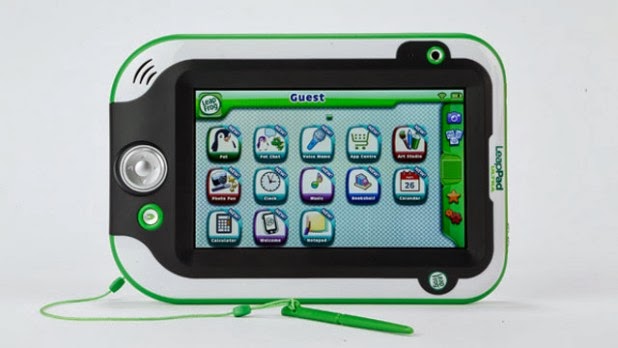
The differences between the Ultra and a ‘proper’ 7-inch
tablet are light and day. It’s more toy than tablet with its heavy-duty plastic
body and chunky, easy to press buttons. The bezel around the screen is raised
to protect the display when dropped and the grey soft touch plastic on the back
makes the Ultra nice and comfortable to grip. Comfort is a big deal especially
when you realise that weighing in at 1.2kg, it’s significantly heavier than the
LeapPad 2 (771g) and more cumbersome than the iPad Air (490g).
Like the LeapPad 2, there’s a main camera on the back along
with the on/off button and micro USB charging port. Up top are the volume
buttons, headphone jack and the cartridge slot. Beside the screen is the
front-facing camera and down below are the navigation and home buttons. The
stylus is tethered at the bottom and fits snug into a stowaway compartment on
the right hand side.
We never expected the Ultra to match the slimline profile of
the iPad