Showing posts with label Apps. Show all posts

Best Twitter Apps to download 2014

If you're looking for the best Twitter apps for iOS and Android you're in luck. We've sought out the best apps for cutting through the noise and getting the most out of this fantastic service.

So you want to stay connected, and you want the best experience. To find the best Twitter app, and there are almost as many out there as there are waffling tweeters, you’re going to need to look at your own requirements. Do you need a fire-and-forget 10 second update, or a flexible fully-featured app that you can put hours in to?

Do you want something minimal and functional or packed with features? Do you want a core Twitter experience, or something… strange? We’ve found all those things and everything in between in our roundup of the best mobile Twitter experiences. Read on!


1. UberSocial (Android, iPhone, Blackberry)

We’ve picked this one out not because it’s particularly remarkable as a whole -- although it’s pretty decent -- but because of its Ubermenu feature, a customiseable menu that lets you organise your most used features. If you’re forever fighting with your current Twitter client’s UI, this is for you.

Free / $4.99 | UberSocial


2. Twitter (all platforms)

Third party apps aren’t everything. Twitter’s own app -- following its investment in Tweetdeck, and considering its intimate knowledge of the network’s workings -- is actually one of the best apps out there, particularly in the conversation view. Before you go elsewhere, try the real thing.

Free | Twitter


3. Twidere (Android)

Many of us have multiple Twitter accounts -- let’s face it, who hasn’t started a novelty account at some point? Twidere lets you merge all of your timelines into one, and mark up specific users with colours, meaning you can get a good glance at a busy timeline even when scrolling through it at speed.

Free | Twidere


4. TweetsPie (Android)

You haven’t got time for Twitter really, have you? No. So grab TweetsPie, and you’ll only ever see the top 21 tweets from your timeline, based on their number of retweets. You can only retweet and hide users -- if you want any more interaction beyond this quick burst at a glance style, look at just about any other client. But keep this installed alongside, because the homescreen widget is actually pretty handy to have around.

Free | TweetsPie


5. Tweetcaster (Android, iOS)

Features? You want
Share On:

Best photo editing app to download 2014


Getting the best photo editing app can turn your phone snaps into works of art, and help you get more from your smartphone or tablet. Whether you're looking for the best apps for Android, iOS, Windows or Mac, we've scoured the web for the best free and paid for photo editing apps money out there.

Apps for photo editing are more and more powerful, whether they're for your phone, browser or PC, you now no longer have to depend on pricey software like Adobe Photoshop to touch up your snaps and make them look fantastic.

With all the apps on the market, across of load of different stores, it can often be tricky to find the one that fits your needs the most. We've made things a whole lot easier by rounding up ten of our favourite apps for making your photos all nice and shiny. From iOS exlcusives, to multi-platform stars and even ones that only require a browser - these are best photo editing app to download right now.


Oh, and one more thing, we all know Instagram and Hipstamatic are good - but everyone already knows about them, so that's why you won't find them on our list.


1. Pro Camera 7 (iOS)

A replacement for the stock iOS camera app, but one that combines a great quality snapper with a whole host of editing tech. You have much more control over your options here, from exposure altering to choosing a specific point of focus, overall you’ll end up with much better shots. There’s also rapid firing, live data and a self timer, basically every photo option you could want. After you've snapped you can apply of host of after effects, from unique filters to the ones Apple added in iOS 7. A fantastic step up from the in-built app.

69p | Pro Camera 7


2. Photo Editor by Aviary (iOS, Android, Windows 8, Windows Phone 8 )

A great multiplatform app that performs really well on Windows 8 and Windows Phone 8 - if you’ve recently picked up a Nokia Lumia 1520, this is a must download. With one tap you can auto-enhance your snaps, the continue to add to the effects with loads of filters and even some stickers to add that extra bit of charm. All the cropping, resizing and blur/sharpening tools are here, completing a pretty fully featured app.

Free | Aviary


3.
Share On:

Best Messaging App for iPhone


Whether you've just purchased yourself a brand spanking new iPhone 5S or iPhone 5C, or whether you're tied into a lengthy contract on the ageing iPhone 4S, chances are you are going to want to use your iPhone for more than just web browsing or taking pictures.
With Apple's App store currently populated with over one million apps, there are bound to be some real gems, as well as some duds across all categories. We've searched through and picked out what we feel are the best in order to connect with your friends and family, as well as a look to some alternatives.
Obviously, there are some in built options like the Messages app that is tied in so seamlessly with iMessage, Facetime or Apple's preinstalled email application. There are, however, a variety of apps available on the App store designed to complement or replace these.


WhatsApp (First year free, $0.99 per year thereafter)

There is no way of completely replacing the messaging app within your iPhone. Being a locked down system means that Apple has total control, so completely replacing the SMS app on the iPhone is nigh on impossible.
WhatsApp was designed to replace standard SMS apps across multiple OS', so is a very comprehensive app and comes with the same features that you would expect from any decent messaging app, with the same features being familiar to anyone that has used WhatsApp before.
Rather than using a username or password, WhatsApp works with your mobile number and uses the web rather than the mobile network, therefore meaning that there are no international messaging charges (as long as you're on Wi-Fi while abroad).
WhatsApp is very popular across multiple OS' for a reason. Its highly customisable, and very easy to use to message others on the service as it connects via your mobile number.
If you decide that WhatsApp isn't for you, why not try Samsung's ChatON? Now available across multiple OS' ChatON is a well designed, comprehensive messaging app that even features a built in translator.


Skype (Free)

Skype is possibly the most well known and popular video calling service that is available on both iOS and across both mobile and desktop OS'.
Now part of the Microsoft family, Skype provides both a comprehensive messaging and calling service that almost renders Apple's FaceTime pointless.
Being more than just a video and voice calling service, Skype fully supports
Share On:

LeapPad Ultra review

Pros
-Better quality 7-inch screen
-Improved battery life
-Closed web environment

Cons
-Expensive apps
-Sluggish performance

-Storage is not expandable


Key Features: 7-inch 1,024 x 600 screen; Built-in Wi-Fi; 2-megapixel front-facing and rear-facing camera; 9 hour battery life; Child safe web browser; 800MHz processor; 8GB internal storage
Manufacturer: Leapfrog


1. Design, Screen and Cameras

LeapPad Ultra review

What is the LeapPad Ultra?
Picture this Christmas Day scenario. You’ve just unwrapped a shiny new iPad Air and as you retreat to the sofa to watch the Only Fools and Horses Christmas special for the eighth time a little pair of hands gets hold of the Apple tablet and stumbles across a naughty web page or even worse, spends hundreds of pounds on more Candy Crush lives.

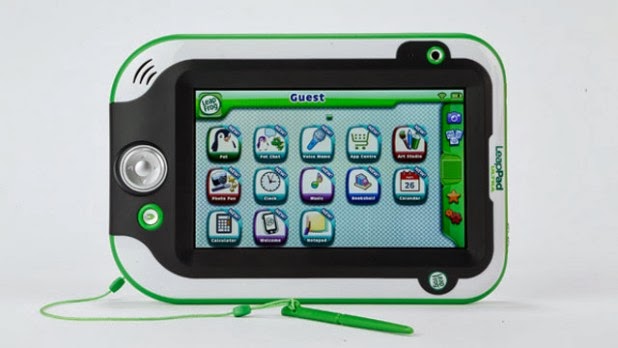
The LeapPad Ultra is a 7-inch tablet for kids that could stop that very situation from happening. The follow-up to the LeapPad 2, the third generation tablet from LeapFrog designed for children aged 4-9 runs on its own operating system and now features built-in Wi-Fi so you can surf the web and download apps directly to the homescreen.

Priced at £89.99, the Ultra is cheaper than the Nexus 7 2,  the Tesco Hudl and Advent Vega Tegra Note 7 although you will have to make do with a slower performance in favour for a design that’s built to take some damage.


LeapPad Ultra: Design
The differences between the Ultra and a ‘proper’ 7-inch tablet are light and day. It’s more toy than tablet with its heavy-duty plastic body and chunky, easy to press buttons. The bezel around the screen is raised to protect the display when dropped and the grey soft touch plastic on the back makes the Ultra nice and comfortable to grip. Comfort is a big deal especially when you realise that weighing in at 1.2kg, it’s significantly heavier than the LeapPad 2 (771g) and more cumbersome than the iPad Air (490g).

Like the LeapPad 2, there’s a main camera on the back along with the on/off button and micro USB charging port. Up top are the volume buttons, headphone jack and the cartridge slot. Beside the screen is the front-facing camera and down below are the navigation and home buttons. The stylus is tethered at the bottom and fits snug into a stowaway compartment on the right hand side.

We never expected the Ultra to match the slimline profile of the iPad
Share On:

Best Camera Apps for iPhone


For many people purchasing a smartphone, having a decent camera is still one of the biggest draws. It seems forever ago that cameras were first introduced on mobile phones, with 13 years being about 6 lifetimes in the tech world.

Today's camera phones are modern wonders, and with more photos being taken on an iPhone every day than any other camera, there must be something that Apple is doing right.

The iPhone 5S now comes with an upgraded 8MP iSight camera, which Apple says is 15% larger and 33% more light sensitive than the previous model, the iPhone 5.

Apple has taken a similar approach to its newest camera as HTC did on its UltraPixel tech debuted on the HTC One. An increase in pixel size has lead to more light being taken in by each pixel, meaning better all round photography, especially in lower lighting conditions.

But let's not forget the ageing iPhone 4S also has a really decent camera that many would argue was better than many handsets released at the same time. This understandably lead to a significant amount of camera apps on the App store, should you want to get more out of your iPhone's camera, so we've trawled through and rounded up our best picks for you to chew over.


Instagram


With the photo creation and sharing app being famed for both the right and wrong reasons (anyone remember Insta-adgate?) it is easy to see why Instagram became so popular, if only to share photos of dinners and cats.

Photo sharing can be argued to be the biggest draw of Instagram, although an equal amount of people will argue its the range of filters that Instagram allows you to apply to your photographs, allowing even the most amateur of photographers feel like a pro.

The app also allows you to manage your Instagram account, viewing photos from those that you follow, and make comments. There isn't a whole lot we can say about the Instagram app, as its popularity means that most of it has already been said.

If social photography is more your thing, why don't you check out the Facebook Camera app. It is literally what it sounds like, with the app allowing you to post photos to your Facebook account quicker than ever and see what your friends are up to. 


Flickr

Flickr is a photo sharing and editing site, with a
Share On:

Startup Meta Challenges Google Glass With Sleek, $3,000 Smart Glasses

Prototype of the metaPro which is slated to ship in June for $3,000; image via Meta


Google GOOG +1.3% Glass has raised the profile of glasses as a new form factor for computing, and in its wake has come a raft of startups with their own interpretations how of computers could sit on the bridge of your nose. One of the most ambitious is Meta, a Silicon Valley startup that aims to outdo Google on two fronts: its technology uses gesture recognition to let you manipulate the digital objects the glasses show in front of you, using augmented reality. It also want to avoid turning its early adopters into geeky, “glassholes,” designing its device to  look as stylish as your average pair of sunglasses.

The first iteration of Meta’s glasses, the Meta 1 and 2, were actually more of a headset than glasses, and more bulky than stylish. They featured block-like frames and a strap that went around the head. On Tuesday Meta unveiled metaPro (pictured above), an upgrade to its glasses design that looks sleeker overall and does away with both the strap and block-like look. It weighs 180 grams and boasts of a virtual display that’s 15 times larger than that of Google Glass, optics that are 2 mm thin and a 40 degree field of view aligned for stereoscopic display.

Sensors that were previously on top as a detachable block have now been built into the brow of the glasses. Co-founder Meron Gribetz says for the next series of metaPros after this, sensors will shrink even further to the size of a stick of gum. The metaPro goes on sale on the Meta website Tuesday, and the company says it will ship to consumers this June 2014.

The glasses are not wireless like Google Glass, though Meta wants them to be eventually. Instead when wearing the device, a single cord runs down the wearer’s back and plugs into a rectangular, mini computer in their pocket. This mini computer is slightly larger than an iPhone, and takes care of all the processing power and wireless connectivity for the glasses. Meta expects early customers to use the metaPros primarily at home, virtually connecting to their smartphones which might be in another room, so that while holding out their bare hand in front of them they can see a virtual manifestation of the phone and use it to take calls or
Share On:

Nest Protect review: smoke detector for the generation of the smartphone


Pros
 -Remote control via a mobile app
-Gesture control
-Clever uses of color notifications
-Sleek design

Cons
-Expensive for a smoke detector


Back in 2011, Nest did the impossible: It made thermostats sexy. Apple veterans Tony Fadell and Matt Rogers applied their iPod-designing expertise to the largely utilitarian world of home-climate control, creating the Learning Thermostat, an appliance aimed squarely at the gadget-obsessed citizens of the smartphone age. And then, earlier this year, Fadell and Rogers took on another traditionally banal (but utterly important) aspect of home life: the smoke detector. The conceit of the Nest Protect was to bring some of the same aesthetics and smart features that made the company's first product a success.

The result is a smoke/carbon monoxide detector with mobile device connectivity and a range of expressions that go far beyond the old beeping alarms, as well as a unique gesture feature that lets you silence the device with the wave of a hand. Admittedly bummed at the inability to test the Learning Thermostat in my prewar New York City apartment building, I happily jumped at the opportunity to review the Protect. So Nest sent along two devices, a can of something called a "smoke detector tester" and, thankfully, thorough instructions on how one goes about testing smoke detectors without accidentally burning the house down.


Hardware


Given Nest's origins, it's not especially surprising that the company managed to make even the product's box a thing to behold. The message is pretty clear: If Apple ever saw fit to produce a smoke detector, it would look something like this. It's a well-designed bit of packaging that looks more suited for a Best Buy vending machine than a dusty hardware store shelf. Inside, you'll find a wall mount, a set of four screws embedded directly into the cardboard packaging and an awful lot of paperwork -- after all, making sure the device works properly could be a matter of life or death. As for the Protect itself, you've got two options, both at the same price point: a battery-operated model, and a wired version for those who want to tap into their home circuitry. Seeing as how I won't be using the detector permanently, I opted for the latter, which comes with six AA Energizer Lithiums pre-installed. 


Like most current smartphones, the Protect comes in either black or white. Nest sent me two white devices, thankfully --
Share On:

Netflix vs LoveFilm

Which is the best on-demand video service?


Netflix vs LoveFilm Instant: which is best?

Netflix and LoveFilm Instant are the two best-known movie streaming services in the UK. You pay £5.99 every month and you can watch as much of the giant library of TV episodes and films on the services as you like. Many people are using platforms like Netflix to trade in their own scheduled TV watching. However, which one is better – LoveFilm or Netflix?

Which is available on the most platforms?

Netflix has an immediate advantage as it supports the most platforms. Indeed, it's hard to
think of a platform that Netflix doesn't support.

LoveFilm Instant's platform support is strong in many areas, but it has one or two serious omissions.

The worst of these is that lack of a proper Android app. LoveFilm has an Android app, but it only lets you watch trailers and manage your queue for disc delivery.

Other notable absentees are a dedicated Windows 8/RT app, Apple TV, Panasonic TVs and Roku.

If you're an Android phone or tablet owner, or want the absolute best compatibility possible, Netflix is the victor here.

Winner: Netflix

Which is easier to use?

Netflix has a more consistent user interface than LoveFilm. Its ‘lean back’ interfaces for games console and TVs are simpler, and unlike LoveFilm, the web interface doesn’t feel completely different to the other means of using the service.

LoveFilm Instant’s issue is that it is still tied to the DVD rental that remains a key part of LoveFilm as a whole. It also feels as though less care has been put into the design of its more casual interfaces – used in games consoles and the like. It’s a bit fiddlier – although the experience of searching for a film is still the same scroll fest as it is on Netflix.

Some of you may like LoveFilm’s web-based interface as it lets you see how exactly how many films are available in each genre. But it isn’t pretty. And it is a bit dated.

Winner: Netflix

Netflix vs LoveFilm Instant: Which has the better film selection?

The unfortunate truth is that the film selections on both Netflix and LoveFilm are not going to be enough to fully satisfy the needs of a true film fanatic. Neither has brand-new films and neither has a truly gargantuan library. Each has a few thousand films - including plenty of rubbish.

Both are subject to the
Share On:

Grand Theft Auto: San Andreas - IPhone & IPad review


Pros
Reworked graphics, classic gameplay, touchscreen controls adapted for re-release, hours of gameplay if you have the drive to do it all again

Cons
Without a controller it's a nightmare to control some sections, iOS only for now, some things are best remembered as they were


On the memories. Grand Theft Auto: San Andreas was the 2004 classic that kept students from lectures, parents from work and players the world over hours-deep into gun-toting and generally mad cap antics. The era of PlayStation 2 may be over - but San Andreas has resurfaced for iPhone and iPad, mobile gaming fans.

That’s right, you can thumb your way - literally - though Los Santos and relive those memories. But are such memories things that should be kept locked in a box? For the near-decade-old title shows its age - impressive though it is that what was cutting-edge previous-previous-gen console stuff in 2004 now looks even better on an iPad - and with the hands-to-touchscreen control mechanism does it translate well to the casual mobile gamer?

Fond memories

From the off GTA San Andreas makes us realise just how far gaming has come. This is no Grand Theft Auto V in terms of visuals, as the cruder character models and jittery directing can attest. But it’s still loveable in its mobile form and, thanks to remastered graphics and lighting enhancements, delivers high-resolution pop. Still, it looks undeniably dated. Like watching old 4:3 format TV shows and scratching your chin as to why they're not as good years later.

If you’re totally new to San Andreas then here’s the skinny: you play Carl Johnson, a young black gang member who takes up the lead role, having returned to the city following word of his mother’s death. But it’s only a matter of seconds before the cops are the case and things start to get nasty. You’ll need to work your way up the gangland chain by any means necessary - and that’s where the fun stuff, morally wrong as it may be, comes into play.


Rob, steal, shoot - all the video game nasties stuff is here. Just because it’s a couple of generations old doesn’t make it any less potentially offensive.

And as we roamed the vast virtual world of San Andreas, complete with foggy draw-distance and various effects popping up into view as they arrive on the small screen, it
Share On:

Spotify review

Pros
-Vibrant social features
-Excellent features
-320kbps streaming
-Exclusive content

Cons
-Clunky web player
-Poor search
-Messy organisation


In Europe at least, Spotify's success has been unparalleled. The service has become a by word for music streaming, and its star has risen fast, taking the subscription music model into the mainstream.

For a few years the lack of competition meant that Spotify's life was relatively easy, and its biggest worries were turning its free users into paid-up Spotify Premium subscribers.

However, things now aren't so simple. The likes of Google Play Music All Access, Napster, Deezer, Xbox Music, Nokia Music and now even Beats Audio muscling in on Spotify's action means life has never been tougher.

But does Spotify still have the advantage over its rivals? Or is the incumbent lagging behind the new pretenders on the streaming scene? Let's take a look.


                                            Create, share and subscribe to playlists


The catalogue

Spotify's 20 million-track catalogue was once the envy of the streaming word, and it still edges the competition.

But line up the main players of Napster and Google Play Music All Access and compare song for song, and you won't find much difference. The selection offered by streaming services is frankly awesome, but Spotify's super strong brand does give it the edge.

In the latest update to the service, it was revealed that Spotify had secured exclusive rights to the catalogue of long-time digital dodgers Led Zepplin. The company also won rights to Metallica and Pink Floyd ahead of its rivals, and shows that being the big player has huge benefits.

Being the big brand also works against them, too. In 2013 Thom Yorke famously pulled his solo work from the service citing poor returns for small bands and artists – but Erazer and Atoms for Peace are still available via Google Play.

It's a tough call but Spotify's catalogue, coupled with its power to win high profile exclusives certainly gives it an advantage over its rivals. But with the line-ups of its rivals looking strong, there's more to a service that just the selection.


                                 The desktop app works well but needs better search features


Desktop app

The premise of
Share On:

Valve SteamOS is available for download


And just like that, Valve's SteamOS is upon us.


Valve's new operating system has headed into the wild, available for consumers and OEMs alike to download and take for a ride.


But be warned - Valve advised earlier this week that for now only the most dedicated Linux users should download SteamOS, which is still in beta. The rest of us are best left waiting till 2014 to access a more finished version.


Valve isn't joking either; a SteamOS FAQ warns both the system's install methods "will erase everything on the machine," meaning only the truly committed should saddle up.


Several reports indicate there are currently issues downloading SteamOS, potentially do to a rush of eager users. If you feel competent and confident enough to give the system a spin, you can download the 960MB installer by following the link provided by Steam Database or through the instructions in the FAQ.

What we know about SteamOS


The release of SteamOS falls on the same day Valve's Steam Machine prototypes are making their way to 300 beta testers, who via email instructions can go about installing the software.


Designed to
Share On:

Apple iWatch release date: October 2014


The Apple iWatch could benefit from wireless charging when it launches in October next year.


According to new information, the Apple iWatch will feature wireless charging functionality, something that has yet to be included in any Apple product so far.


If this is true, it would allow you to charge the iWatch from up to one meter away from the charging pad, making a little more convenient to charge overnight.


What is worrying is that Apple is reportedly testing a prototype iWatch with a rather measly 100mAh battery. To put this into perspective, the Samsung Galaxy Gear smartwatch has a 315mAh battery and will only last a day at a push.


Of course,
Share On:

Moga Ace Power review


Pros

Gives you physical keys to play games, extra battery to charge your phone on the go, works with iPhone 5S and 5C.

Cons
Feels cheap, not all games support the controller, can't map keys to the games.


The Moga Ace Power transforms your iPhone into a gaming controller so you can get the most out of analogue, off-screen controls for those many titles available in the app store.

Compatible with the iPhone 5, 5C, 5S and fifth-gen iPod Touch, the Moga is the first game controller for iOS 7 - made possible due to changes in the latest version of the Apple mobile OS.

If you’re a ken gamer then the ability to transform your phone into a more tuned gaming device sounds like an ideal solution. Priced at £80, is it a worthy investment compatible with enough games, and is it easy enough to use that you’ll want to carry it with you everywhere? We've been button-bashing like crazy to find out.
Design

The Moga Ace Power looks like a stubby Xbox 360 controller without an Apple device mounted up: it features two analogue sticks, a d-pad, four buttons comprised of A-B-X-Y and a further four shoulder buttons.


You then
Share On:

74 per cent of Apple devices is running iOS 7


Just under three quarters of all iPads and iPhones are now running iOS 7, according to the latest figures from Apple.


According to the latest figures on Apple’s developer website, 74 per cent of iPads and iPhones are now running iOS 7.

It also revealed that 22 per cent of
Share On:

Apple iWatch Price, rumours, release date and leaks


The Apple iWatch is rumoured to be in some form of production right now – we round up the news and speculation on its specs, features and potential release date.


If Apple is going to follow the likes of Samsung and Sony and release a smartwatch, the company could do it tomorrow at the iPhone 5S launch event. We'll be covering the event live over on our Apple iPhone launch event: Live blog page, so stay tuned to see what Cupertino has in store.


The most recent development suggests that Apple is now hiring large numbers of designers and technical experts to help the company reach its goals in creating a wrist-based Apple device, the rumour comes from the Financial Times who also report that there are concerns over whether Apple has the know-how to create such a complex device to their own extreme standards.

Supposedly a team of ‘about 100 product designers’ are working on the iWatch – including managers, marketers and software and hardware engineers who previously worked on the iPhone and iPad. That’s according to two people ‘familiar with the company’s plans’, which puts them in a remarkably small category.

According to the two in the know, the project is ‘beyond experimentation phase in its development.’

Apple iWatch will be called....
iWatch

In case you were wondering, which we're sure you weren't Apple will almost certainly be calling its Smartwatch the Apple iWatch. This comes after confirmation came in that the tech giant had filed iWatch trademarks in Japan and Russia.

What you may not have been expecting however is the news that Apple may not be able to call its product the iWatch in the UK, instead having to come up with a different name after it was revealed that iWatch has already been trademarked in the UK, US and in Europe.

Apple iWatch price

Sadly there hasn't been much talk about what Apple's iWatch will cost, but thanks to other companies jumping on the bandwagon we can get a rough idea of what the cost will be.

The Sony SmartWatch 2 is set to land in September this year with a price tag of around £150, that means that if Apple applies its usual premium price tag you could be looking at between £180-£220 for your very own iWatch.

With rumours circling that Nike could be launching a new Fuelband as well all eyes will be on
Share On:

Ahead of Christmas, ZowPow Launches Plush Toy Controllers That Interact With Mobile Games

Like moths to a flame, kids gravitate toward iPad and iPhone games. But for parents that want their children to still be exposed to real-world toys, a new startup called ZowPow is offering a way that they can do both.

The company makes plush toys that can control gameplay.

One of their very first toys is a tiny plane that can control up-and-down movement for a paired game called “Tiny Plane,” which is published by EA’s Chillingo.

The game controller they built has built-in sensors and accelerometers that can tell which direction the plane is facing, so that the plane in the game mimics its movement through Bluetooth LE (see the video below).

The two-person start
Share On:

Dealing with disaster: how social media is helping save the world


In emergency situations, when fleeting seconds can be the difference between life and death, instant social mediums like Twitter have proved invaluable.

Whether it is members taking heed of the hashtagged, location-aware updates from those also affected by natural disasters, or others receiving vital communications from news organisations, emergency services and aid organisations on the ground, lives have undoubtedly been preserved. Beyond that, an estimated 76 per cent of Americans have used social media to let their families know they're ok, during a disaster… and that was in 2010.

However,
Share On:

Twitter Enables Perfect Forward Secrecy

Twitter Enables Perfect Forward Secrecy Across Sites To Protect User Data Against Future Decryption


Twitter has enabled Perfect Forward Secrecy across its mobile site, website and API feeds in order to protect against future cracking of the service’s encryption. The PFS method ensures that, if the encryption key Twitter uses is cracked in the future, all of the past data transported through the network does not become an open book right away.
“If
Share On:

Apps to shop for christmas


Some enjoy the hustle and bustle of the high street as Christmas approaches, others find it stressful, irritating and soul destroying.
If you fall into the latter camp and would rather sit in the comfort of your home watching the X-Factor, getting organised and finding the perfect present from your sofa, here are some apps that can make that dream come true.
But a word of warning - keep an eye on those delivery deadlines. The smug sensation of dodging the crowds will fast evaporate if your mum's present is still at a Royal Mail sorting office come the 25th...
Share On:

Microsoft Brings Automatic Camera Backup To SkyDrive On iOS

Today Microsoft updated its SkyDrive application for iOS to include automatic camera backup. Users of SkyDrive can now opt to have every photo that they shoot on their iPhone saved and stored in Microsoft’s cloud.

SkyDrive provides a decent, if still inscrutably numbered 7 gigabytes of free storage – why not 8 or 8.1 remains outside of my comprehension – which you could quickly fill with photos. Still, Microsoft has integrated SkyDrive deeply across its products, meaning that if you exist at all in the world of Windows (Xbox One, Windows 8.1 and so forth), having your iOS photos quickly stored has real use: They are now accessible across your
Share On: